Гӯшмонакҳо & Гирӯяҳои яклухт

Srears@okoqeqe.com |

SingleEarWirelessHeadsetwithMicforWorkWholesaleOnline

Гӯшти ягонаи Bluetooth/

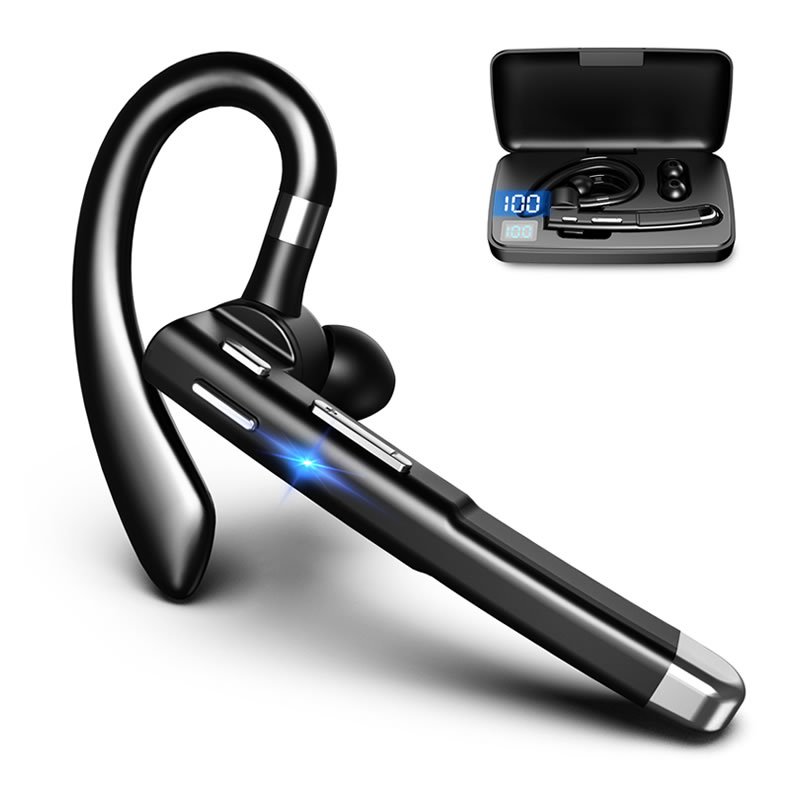
Гӯшмонаки бесими гӯш бо мил ба кор – Мувофиқ барои пайвастшавӣ ба телефонҳои мобилӣ – Yyk-530

  • Бренд: Бетараф
  • Модели рақами: Yyk-530
  • Навъи: Гӯшмонакҳо, Гӯшти ягонаи Bluetooth
  • Ранги: Сиёҳ
  • Версияи Bluetooth: 5.3
  • Диапазони Bluetooth: 10м
  • Навъи порти пуркунандаи барқ: Навъи C
  • Батарея: 260мАч барои қуттии барқ, 30мАч барои гӯшмонак
  • Вақти пуркунии барқ: 1.5H барои гӯшмонак, 3-4H барои парвандаи пардохт
  • Product Dimensions: 4.33 х 3.15 х 1.18 инч
  • Вазни ашё: 7 унция
  • Технологияи пайвастшавӣ: Бесимӣ
  • Профилҳои Bluetooth: HFP/HSP/A2DP/AVRCP
  • Технологияи алоқаи бесим: блутуз
  • Дастгоҳҳои мувофиқ: Ҳама дастгоҳҳо ва телефонҳои мобилӣ, ки Bluetooth-ро дастгирӣ мекунанд
  • MOQ: Нейтрал MOQ 10PCS / OEM MOQ 100PCS

  • Тафсилоти маҳсулот
  • Саволҳо
  • ФИРИСТОДАН
  • Зеркашӣ кардани дастури корбар

Make sure the headset is off, press and hold the multifunction key for about 3 seconds until the blue light comes on once,Then the red and blue lights flash alternately (at this time it enters the pairing state) and waits for the connection.

Turn on the Wireless function of the user’s mobile phone
(or other Wireless devices), and search or scan,At this time, the
mobile phone will search all the Wireless devices nearby, and click the Headset Name: Yyk-530, and enter the password 0000 (most mobile phones do not need a password at present)
After successful pairing and connection, the headset indicator light goes off, indicating that the pairing connection is successful!
At this time, you can make mobile phone calls and listen to songs

ON/OFF switch
1.In the first time use, take the headset from the charging bin and peel off the protective film. Once put into the charging bin, the headset will turn off and initiate recharging automatically. When taken out from the
charging bin, the headset will turn on automatically.
2.After use, put the headset into the charging bin, and it will turn off automatically.

How to pair
1. Take the headset out of the charging bin and it will start work automatically.
2. The red and blue lights will flash alternatively (entering pairing mode) 3. Access the Settings of mobile phone/tablet — Бесимӣ — Кофтуков
— Yyk-530 — Pair/ConnectPlay music.

Pair with PC/Laptop
Turn on the computer Settings-Devices-Wireless and Other Devices
Initiate WirelessAdd Wireless or Other DevicesSearch Wireless
– Yyk-530 – Pair/ConnectPlay music.
Notes: If the computer has not Wireless function, please insert a Wireless adaptor,and download a Wireless driver for normal functioning.

How to reset?
When the headset is off, press the on / off key for 8 seconds. Put the headset into the charging compartment, and the headset will automatically turn off and start charging. After taking out the headset, the headset will turn on automatically, and the reset is completed.

How to recharge the headset
1. put the headset in the charging bin, the headset will be automatically turned off and then charged.
The display lights up to show the current power of the charging chamber, indicating that the charging chamber is charging the headset.
2. When the headset is fully charged, the red light of the headset indicator will be off.


Гӯшмонаки бесим

С: Оё ман метавонам намунаи ройгонро барои арзёбии сифат гирам?

А: Бале, шумо метавонед намунаи ройгонро бе логотипи фармоишӣ гиред. Танҳо ба мо бигӯед, ки ҳисоби ҷамъоварии борҳои шумо ба монанди DHL, FedEx, TNT, ғайра. Агар шумо ҳисоб надошта бошед, мо бояд арзиши экспрессро пардохт кунем.


С: Барои тайёр кардани намунаҳо ба шумо чанд вақт лозим аст?

А: Одатан, сарф кардан лозим аст 1-3 рӯзҳо омода кардани намунаҳо бидуни дархости фармоишӣ.


С: Метавонам ашёро бо логотипи / бренди худ тамға диҳам?

А: Хуш омадед OEM ва ODM.

1) Logo / намуна + $ 0,30 / дона (Мин. фармон: 100 дона)

2) Бастабандии фармоишӣ + $ 0,70 / дона (Мин. фармон: 1000 дона)


С: Дар бораи бастаи стандартӣ чӣ гуфтан мумкин аст?

А: Мо қуттии тӯҳфаҳои бетарафро пешниҳод мекунем. OEM Giftbox мувофиқи талаботи муштариён қабул карда мешавад.

Фиристодан

  1. Аммо интиқоли пардохти ҷониби шумо лозим аст, Одатан мо тавассути DHL UPS мефиристем, FEDEX TNT. ё мо метавонем бо ҳисоби шумо ё интиқол ба экспедитори шумо дар Чин фиристем.
  2. Барои миқдори калон, Мо метавонем тавассути баҳр фиристем

Ба порт интиқол диҳед:

  • OKOQE Medical Ltd барои интиқоли мол ба бандар масъул аст. Ҳама пардохтҳои гумрукӣ ва нақлиёти минбаъда ба дӯши харидор мебошанд.
  • OKOQE Medical Ltd ба шумо экспедиторҳои боэътимоди маҳаллиро тавсия медиҳад.
  • OKOQE Medical Ltd метавонад ба пешрафт бо иҷозати харидор ва аз ҳисоби харидор мусоидат кунад.

Огоҳӣ: Маълумоти дар боло зикршуда танҳо барои истинод ба шумост,мо шуморо дар бораи ҷадвали интиқоли пайгирӣ огоҳ хоҳем кард.

Интиқоли байналмилалӣ

Интиқоли байналмилалӣ

YKK-530 Bluetooth Wireless Headset User Manual in 6 Забонҳо

PDF YKK-530 Bluetooth Wireless Headset User Manual Datasheet

Ҳамаи дастури истифодабарандаи гӯшмонакҳо

PDF Ҳамаи дастури истифодабарандаи гӯшмонакҳо

Пеш:

Баъдӣ:

Ҷавоб гузоред

Паём гузоред